
PayPal Payment














Your payment is used to keep information like this posted (...$19.99 is less than you were expecting to spend to get your radio fixed). You can click on one of the PayPal icons below (depending on which repair you are looking to make) to make your payment via PayPal (Visa and Mastercard accepted via PayPal).
NOTE:
Your login and password will be immediately sent to the email address
that is registered with your PayPal account. If this is not the
proper email address you want the login and password sent to, please send
a note with the proper email address, however, there will be a delay as
the email will have to be manually processed. If you want to avoid
any delay, make sure your PayPal email address is correct.
MAKE SURE YOUR EMAIL IS CURRENT AND CORRECT IN PAYPAL TO AVOID DELAY ON DELIVERY OF YOUR LOGIN AND PASSWORD.
If you realize that it was not current when you confirmed your PayPal contribution, please send me an email (dharrison@shareamemory.com)
NOTE: Microsoft's Outlook Express is sometimes set not to allow viewing of attachments due to security issues (this may have been set automatically without your knowledge by Microsoft). If you are unable to read the attachment that is automatically sent to you once you donate via PayPal (or you do not see an email reply within 10 minutes), try this: In Outlook Express click Tools, Options, Security and uncheck the box by "Do not allow attachments to be saved or opened that could potentially be a virus". You may re-enable this once you have the chance to get your login and password from the email attachment that is sent.
BLANK DISPLAY or VOLUME CONTROL RADIO REPAIR ACCESS
(Ford/Nissan) or DISPLAY FIX FOR ANY OF THE 3 RADIOS PICTURED BELOW
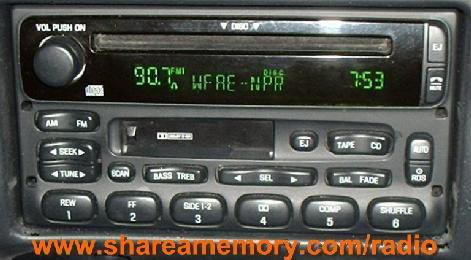
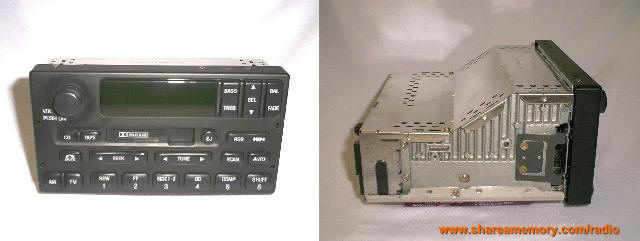

Click one of the above Icons to Purchase the Radio Repair Access
(for Blank Display or Volume Control Repair Instructions)
$19.99
CD EJECT ERROR
ACCESS (Ford/Nissan)
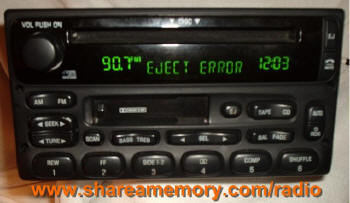
Click one of the above Icons to Purchase the CD Eject Error Access
(For CD Eject Error Repair Instructions - separate cost from the
display and volume control repair listed above)
$19.99
COMBO REPAIR - DISPLAY/VOLUME
CONTROL/CD EJECT ERROR ACCESS
(Ford/Nissan)
Click one of the above Icons to Purchase the
Combo Display/Volume/CD Eject Error Access
$29.99
"Save My Sanity" Repair Program
"Save My Sanity" Swap Program is no longer available, but I am doing the Save My Sanity REPAIR PROGRAM.
This repair program is the same as the Swap Program except that you have to first ship your power supply board in for the repair - Save My Sanity Repair Program. You send your power supply board in for the repairs and all the modifications, even if you have tried the repairs yourself. The cost is $89.99. If I cannot fix your board, it will be returned without a charge and your payment will be returned.
Upon receipt of payment, I will send you specific, step by step picture-detailed instructions on how to remove the power board from the radio...it's not too hard. If you can get the radio out of the dash (the harder part of the task...which directions are provided free on this web site...click here) , you can get the power supply board out of the radio. If once you receive the instructions you are unable to get the radio out or you think it's too much trouble, let me know and I can refund your payment.
What this new program will do for you is:
*You don't have to do the detailed soldering and trouble shooting.
*You get a known working board that has all the modifications to it so that
you won't experience this again
*If the board cannot be fixed, it will
be returned without cost to you.
*You don't have to go without your radio (if you were going to ship it off for
repairs). You will still be able to listen to your radio,
you just won't have a display (but then again, you didn't have a display
anyway).
Before going this route, please be sure that you are comfortable at the dis-assembly
and re-assembly that is required to replace the board...it basically requires
removing three screws, popping off the front display panel (may require a
small screw driver to assist), popping off the top metal panel of the radio,
then twisting two metal tabs with a needle nose pliers. If you are okay with
that (I will send the specific instructions including pictures to replace the
board), then you are set to proceed with the swap program.
This replacement board is for a MACH radio (also used in various Ford vehicles
and Nissan Quest)...the part number on the radio should be something like
"XXXX-18C868-XX" where the X's can be any type of combination...the "18C868"
should be there on this type of radio. You may want to verify this.
Click the above Icon to Purchase the
"Save My Sanity" Repair Program
using PayPal for $89.99.
Click the above Icon to Purchase the
"Save My Sanity" Repair Program
using Google Checkout for $89.99.
"Save My Sanity" Repair Program
Ford Expedition, Explorer Radio with Cassette and remote CD Changer controls
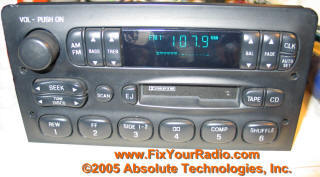
Figure 17 -
Expedition, Explorer Radio with Cassette with remote CD
Controls
(typically a 1997 model year radio)
The problem seen with this radio is the blank display of the radio. The repair instructions are detailed in the repair of this problem.
To purchase access to these instructions for the Expedition / Explorer ('97) Radio Display Repair for the radio shown in Figure 17 above, make your contribution by clicking on one of the icons below:
Radio with Cassette with remote CD Controls shown in Fig. 17$19.99 for the Expedition/ Explorer '97 Radio Repair Instructions
Radio with Cassette with remote CD Controls shown in Fig. 17
THESE PAYMENT ICONS ABOVE ARE ONLY FOR THE RADIO PICTURED IN FIGURE 17! For other radios, go to the appropriate icons!

You may check the status of the server that supplies the password from PayPal by sending an email with the subject "Check Radio Repair Server Status" to server@ab-tech-inc.com. You should receive an email reply back within minutes showing the server is active (if you do not receive a reply, there may be a delay in processing your login due to technical difficulties, but it will still be accepted). This will also give you an idea on how fast you should receive your personal login and password.
NOTE: Microsoft's Outlook Express is sometimes set not to allow viewing of attachments due to security issues (this may have been set automatically without your knowledge by Microsoft). If you are unable to read the attachment that is automatically sent to you once you donate via PayPal (or you do not see an email reply within 10 minutes), try this: In Outlook Express click Tools, Options, Security and uncheck the box by "Do not allow attachments to be saved or opened that could potentially be a virus". You may re-enable this once you have the chance to get your login and password from the email attachment that is sent.
If you have a yahoo.com email address, make sure to check your spam folder...seems like yahoo.com likes to stick my emails in there.
Home Page
Radio
Removal| Ford/Quest
"The Fix" CD
Eject Error Fix
Chrysler
/ Jeep Fix
Save
My Sanity Instructions
Mail Payment
PayPal
Payment
Success
Emails
Post
a Comment
Other Explorer
Issues
Disclaimer
Sponsors